Posts

LIst all VMs Disk in Hyper-V (VMM)

 Here an easy way to list all your VMs disk.  This will be useful if need to check what disk has every machine.  you can then copy the output to excel  $vms=Get-vm -All $file="listvms.txt" for($i=0;$i -lt $vms.count;$i++){foreach($disk in $vms[$i].VirtualHardDisks.sharepath){ $s=$vms[$i].name+";"+$disk; Write-Output $s | Out-File $file -append utf8}} notepad $file Be aware that second time, you shuld use a different file, otherwise you will be adding the results to the same file


Cómo apagar una VM de Azure con un Script

 Apagar una Vm o encenderla utilizando un script no parece complejo, sin embargo, para conectarse a Azure en forma segura hay que cumplir ciertos requisitos. En este post voy a mostrar cómo conectarse a Azure en forma segura, y sin crededenciales, para una operación sencilla como apagar una VM. Tener presente que se utilizará autenticación basada en certificados, y los certificados expiran, por lo tanto, hay que anotar en alguna parte la fecha para renovarlo, sino nuestros script fallarán. Este método es preferido porque evitas tener que almacenar credenciales, en especial si el tenant tiene multi factor auth (MFA) o políticas de seguridad adicionales. Este documento está basado en los módulos de Az para Powershell I. Instalar el módulo Az.compute Este módulo es la nueva forma de conectarse a azure, y reemplaza a AzureRM. Los comandos de AzureRM ya no se podrán utilizar despuésd de febrero de  2024. Ejecuta en powershell  install-module Az.compute Si por alguna razón reci...

Como resetear password root en Ubuntu

Image
 Para hacer un reset de password root de Ubuntu, seguir estos pasos. Se requiere acceso por consola o similar a la máquina. Reiniciar el servidor manteniendo la tecla SHIFT presionada, esto permitirá mostrar el menú GRUB Una vez en el menú, seleccionar la primera entrada y presionar la tecla "e" para poder entrar al menú de edición. En el menú de edición, bajar con el teclado hasta la sección que dice linux /boot/vmlinuz ... Eliminar la última parte de la sección que dice algo similar a "ro quiet splash $vt_handoff".En este caso dice algo diferente, pero el propósito de la línea es el modo Read Only, por eso dice "ro". Cambiar esa parte del texto, eliminando lo que diga "ro ....asdfasdf" por "rw init=/bin/bash" Sin las comillas obviamente. Presionar F10 para guardar e iniciar. El sistema iniciará sin password Se puede ejecutar el siguiente comando para validar el acceso de escritura mount | grep -w / Luego se puede hacer el cambio de pa...

HAFNIUM zero-day exploit Microsoft Exchange on-premises (02-march 2021)

 Hi, Microsoft has detected multiple 0-day exploits against on-premises Exchange servers. This attack has been attributed to a group under name "HAFNIUM" You can find more information about this group in this blog: New nation-state cyberattacks - Microsoft On the Issues So, Microsoft is recomending to install updates on all versions of exposed Exchange servers. This vulnerability does not affect Exchange Online. Any Exchange server on-premises who is publishing HTTPS on internet is a target.  Please follow Microsoft guide for updating your servers: 1. Download this script to check vulnerability status of your servers from Github 2. Download the required Software patch for your server version/edition. (check the requirements!) Exchange Server 2010 (update requires Service Pack 3 – this is a Defense in Depth update) Exchange Server 2013 (update requires CU 23) Exchange Server 2016 (update requires CU 19 or CU 18) Exchange Server 2019 (update requires CU 8 or CU 7) 3. Put your s...

Error 'General access denied error' (0x80070005). Starting SCVMM Resource

Image
 Hello,  After a VMM migration and disk migration I faced this issue. I was unable to start a VM. So if you check on Failover Cluster Manager, you should find this information under "roles". If you check information, it says you should get more information from the "Information Details" windows. This example error says about an Access denied error, so this should be related to permisions. In fact, I did a change on my VMs disk, that is probably the cause on my case.  For resolving I recommend, checking on permissions on the disks of your VM, and if possible, use a tool to copy/paste the correct permissions. Luckly in my case, I do have another disk with the correct permissions, so I used icacls to backup and restore the correct permissions. icacls VM1_mydisk.vhdx /save backup.txt then, you should open the backup.txt file and change the name of the file, to match the destination. then restore using: icacls C:\ClusterStorage\Volume3\VM1 /restore backup.txt After doing...

Reclaim Disk Space from Shadow Copies

Image
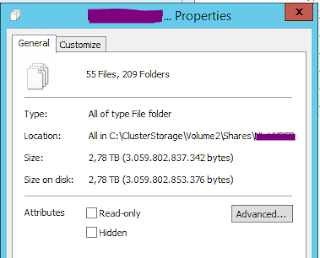
 Hi,  I have found an strange issue that occurs sometimes. Seems that if Backup software fails, or leaves a task incompleted, the shadow copy is not deleted. This causes the disk space to be retained. Majority of backup solutions today uses VSS in Windows for take some kind of "snapshot" of the disk. That is a good thing, but maybe you will experience this situation. In my case, sometiemes this happens when using an Hyper-V Cluster and a bacukp job is interrupted. The first sign is that suddenly you are low in disk space. And seems to be consuming more and more over time... If you have Cluster Shadow Volumes (CSV) and you count the content, you will find that the amount of disk space does not match. For instance, here I have about 2.8TB of data, and my disk has a total of 3.8. So I should have about 1TB of free space.  However, I only have 370GB of free space. This is a sign of something wrong. In my case, executing this commands should help. Fist, you should go to the se...

Instalar DKIM en un servidor Exchange

Image
 Hola, hay un muy buen paso a paso en internet de este procedimiento, pero solo a modo de tener un respaldo voy a dejar aquí los pasos. Lo voy a hacer en español, porque el otro sitio es mejor y está en inglés, qué remedio. El blog original está en https://colinwilson.uk/2017/07/19/setting-up-dkim-for-exchange-server Muchas gracias a Colin Wilson por su artículo. Lo primero que debo decir es que Exchange no incluye esta funcionalidad nativamente (shame) y por ello hay que recurrir a una herramienta de un 3ro.  Primero hay que bajar el DKIM Signer desde el sitio. Ojo con las versiones, recomiendo revisar bien si tu servidor Exchange está en un Cumulative Update (CU) soportado antes de instalar. Revisa bien las notas de cada versión. En  este ejemplo instalé la versión 3.3.1 sobre Exchange 2016 CU 18. Releases · Pro/dkim-exchange · GitHub El archivo que debes bajar es  Configuration.DkimSigner.zip Lo descomprimes en tu server y lo dejas en alguna ruta. Luego al ej...